LIVA MINI PC 是否需要另外安装CPU?
无需另外安装CPU,因为LIVA MINI PC搭载Intel® SoC (System-on-a-Chip)系统单芯片,是指将一个完整的系统(包括中央处理器、内存、以及周边电路等)放入一个芯片中,将电路设计缩小化以及模块化,使其所有功能皆整合在一颗IC当中,直接植入电路板上,也使LIVA MINI PC外形轻薄短小,便于携带。
如何解决LIVA MINI PC蓝牙设备断线问题?
您可至 "我的电脑" 中的 ”设备管理器",关掉“允许计算机关闭此设备以节约电源”来解决此问题。

LIVA MINI PC使用Ubuntu操作系统时不接屏幕无法开机?
因为Ubuntu操作系统的安全机制设定,在Ubuntu操作系统下,不接屏幕将导致无法开机。建议于第一次开机使用时将屏幕连接上,而后续的屏幕插拔将不会导致系统无法开机,或是您可以通过远程登录来解决此问题,相关方法请参考:
LIVA MINI PC支持PXE网络引导功能吗?
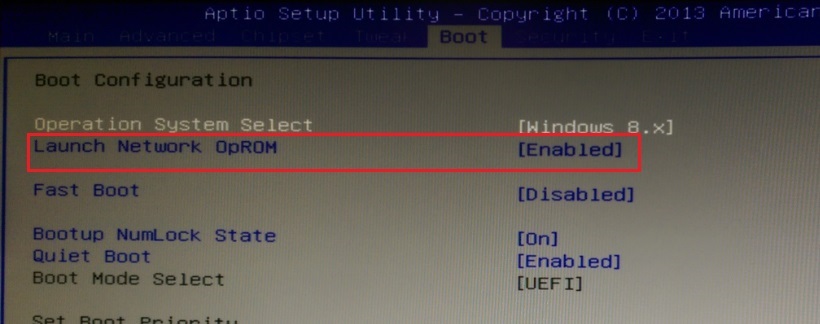
如何在LIVA MINI PC上实现网络唤醒功能?
请按照以下步骤设置,即可实现网络唤醒功能。
1. 开机进入BIOS Setup -> "Power Management Setup" 下,将 "Resume By PME" 设为[Enabled]。
.png)
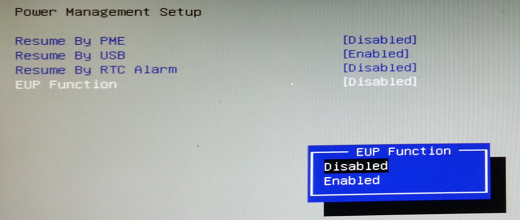
2. 在"Power Management Setup" 下将 "EUP Function" 设为[Disabled]如下图,保存后退出BIOS Setup。
(注: 如要在LIVA MINI PC上实现网络唤醒功能,必须将EUP设为[Disabled]。)
3. 如果您的操作系统是Win8 / Win8.1,您必须取消"系统设置"->"关机设置"里的"启用快速启动"功能(如下图),然后您才可以使用唤醒工具将系统唤醒。
.png)
如何在LIVA MINI PC上实现"定时开机"功能?
请按照以下步骤设置,即可实现"定时开机"功能。
1. 开机进BIOS Setup -> "Power Management Setup" 下,将 "EUP Function"设为[Disabled]如下图。
(注: 如要在LIVA MINI PC上实现"定时开机"功能,必须将 "EUP Function"设为[Disabled]。)
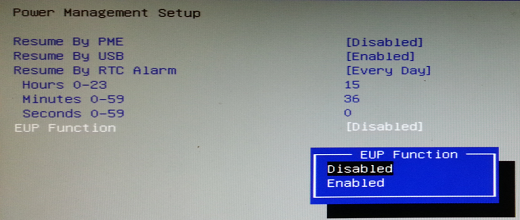
2. 当"Resume By RTC Alarm" 设为[Every Day] 如下图时。
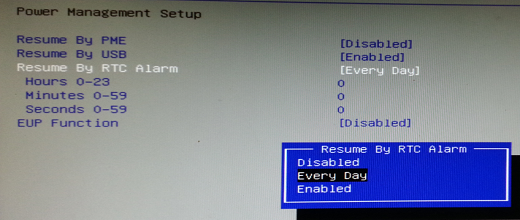
3. 请设定您想定时开机的准确时间 (在此例我们设为00:03:00开机)。
.png)
4. 如果您将"Resume By RTC Alarm"设为[Enabled] 如下图时。
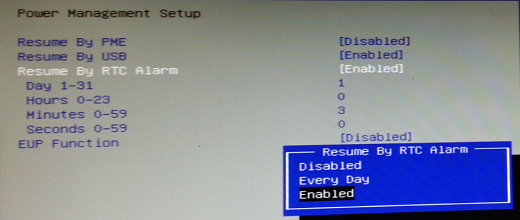
5. 您必须设定您想让系统定时开机的日期与时间 (在此例我们将Date设为Day 1,时间设为00:03:00,如此系统将于每月的1号 - 00:03:00 自动开机)。
.png)
6.如果您的操作系统是Win8 / Win8.1,您必须取消"系统设置"->"关机设置"里的"启用快速启动"功能(如下图),然后"定时开机"功能才可以正常运行。
.png)
Why my ECS motherboard or LIVA mini PC can’t boot up from Windows 10 USB Drive
LIVA XE Supports Windows 10 or Windows 7 OS?
*We recommends to install Windows10, ECS does not provide other OS installation technical support.
If you still want to install Windows 7 on M.2 SSD, please download Windows 7 Image Builder and follow the steps on the below file to get it done.
How to install Windows 10 on LIVA XE
1. Install Windows OS via Windows official DVD.
2. Install Windows OS via USB flash drive.
a) Create an ISO file from the Windows 10 DVD.
This free program from Microsoft properly formats your flash drive and then copies the contents of the Windows 10 installation ISO file to the flash drive.
b) Boot from the USB device that you just created to start the Windows 10 installing process.
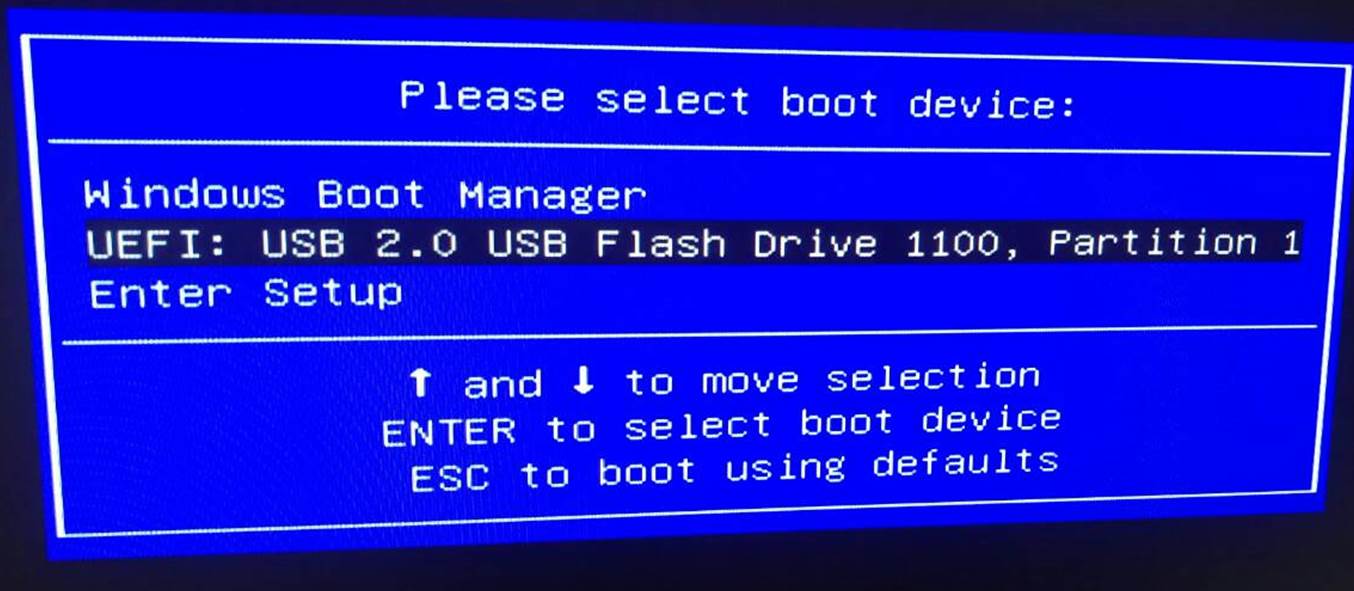
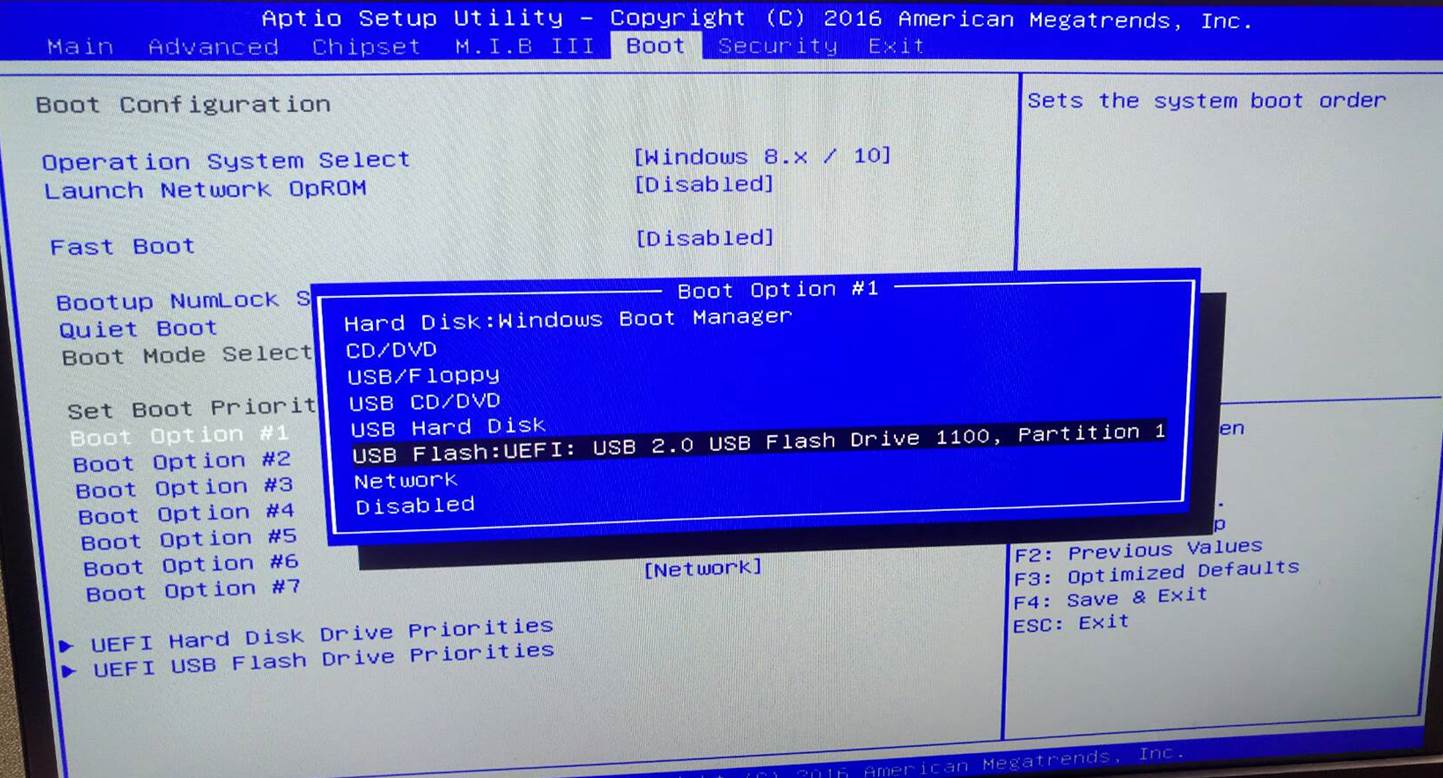
You need to change the booting priority in BIOS in order to boot from USB device. Enter into BIOS and select the Boot in menu (or press the hotkey F7), set USB drive as the first booting priority.
System stays at POST screen when I attempt to install Win10. What should I do?
Can I install Ubuntu OS for LIVA MINI PC?
Ubuntu OS is not officially supported by LIVA MINI PC, but the latest Ubuntu 16.04 LTS is able to being installed into LIVA MINI PC. ECS will provide Linux Ubuntu LTS v16.04 kernel image will include key components of device drivers such as Intel SOC ,LAN, Audio and WLAN/BT.